


 SMS Tracker
  Phone Call Tracker
  WhatsApp Tracker
  Browser History
  Phone Location Tracker
  Call Recorder
  Keylogger for Windows


MoniMaster Support: Monitor devices with others' permission.
The good news is that creating dinosaur videos is now easier than ever. With modern AI dinosaur tools, you don’t need artistic expertise, expensive software, or professional equipment to get started. You can generate a Tyrannosaurus Rex, Velociraptor, or Triceratops within seconds by providing a simple text description.

This article walks you through the best AI dinosaur generators, along with a step-by-step guide to bring your own prehistoric creature to life. So, let’s start creating!
Part 1. Best AI Dinosaur Generators
Many AI dinosaur generators are available online, but only a few tools stand out. These include MoniMaster Video, CapCut, Vivago, Filmora, and Vidu AI. Here’s a detail into what each has to offer:
1. MoniMaster Video

Try It Free
Secure Visit
MoniMaster Video is one of the best AI dinosaur generators for several reasons. For one, the interface is simple, and the tool is powered by the traditional MoniMaster 5 engine, alongside Vidu, Sora, Kling, and Veo 3. This allows creators to use the best engine suited for the particular project.
Further, MoniMaster Video is an all-in-one creative suite that makes it a fantastic tool for artists. Its AI image generator converts simple text prompts into high-quality and stylized dinosaur artwork. You can also use its text-to-video feature to create short animated clips from simple ideas.
MoniMaster Video also allows you to choose the style beforehand for a cinematic, photorealistic, or cartoonish animation. Try being creative by adding a descriptive prompt, and watch MoniMaster Video create magic.
Not only that, if you lack any creative prompting ideas, just head over to MoniMaster Video’s AI Video Effects and select a Jurassic Park effect to picture yourself in the prehistoric era.
2. CapCut

Site: https://www.capcut.com/ai-creator/start
CapCut is a popular AI video creator that can generate a roaring Tyrannosaurus Rex or a graceful Velociraptor with simple prompts. The interface is simple, and the output can run up to 10 minutes.
CapCut’s AI script generation feature is what sets it apart. Based on a simple prompt, CapCut can craft a narrative, auto-captions, and add music to set the perfect prehistoric scene. This makes CapCut a suitable AI dinosaur video generator for creators, educators, and individuals who want to create an immersive prehistoric video in no time.
Unfortunately, CapCut does not offer dinosaur-themed templates, so the output depends on the prompt's creativity.
3. Vivago

Site: https://vivago.ai/effects/templates/2503232e-d33b-43b5-a771-2cd1e63a5758
Vivago is another AI dinosaur-generation platform like MoniMaster Video that requires simple prompts and supports AI models such as Sora 2, Vivago.ai 2.0, and Google Veo 3.1 for added flexibility. The interface is simple, rendering is fast, and it offers additional features like Lip Sync, Remove Background, and Sync. Moreover, there aren’t any inconsistent movements in the video, which matters the most in an AI dinosaur generator. There are, however, no templates like MoniMaster Video available.
4. Filmora

Site: https://filmora.wondershare.com/ai-text-to-video.html
If output is your priority, then Filmora can be a good tool for your AI dinosaur videos. Similar to MoniMaster Video, the AI image, image-to-video, and text-to-video features include style options that let you generate cinematic or cartoonish prehistoric videos.
Additionally, Filmora’s other features, such as AI Object Remover, AI Smart Cutout, and AI Portrait Cutout, make it well-suited for inserting dinosaurs into other scenes. Filmora especially appeals to artists for its layered editing and advanced effects. Artists can use these tools to generate a high-quality clip for social media and other platforms, such as YouTube.
However, the multitude of available features and editing tools can be overwhelming for beginners and casual users.
5. Vidu AI

Site: https://www.vidu.cn/home/recommend
Want to imagine yourself in a Jurassic World scene and get the thrill of a dinosaur chasing across a horizon? Then, Vidu AI’s Dinosaur AI Chase generator template can be a pick. The interface is simple, as you just upload an image to generate a video. In addition to the template, Vidu AI’s text-to-video feature can create a short, full-HD video clip from a descriptive prompt. The rendering speed is decent as Vidu AI generates output within a few seconds. However, Vidu may not accurately model real-world physics across all interactions, which can sometimes lead to erratic motion.
Part 2. How to Create an AI Dinosaur Video
Among available AI dinosaur generators, MoniMaster Video is one of the best AI dinosaur generators for photos, text, and videos. It pairs its simple interface with powerful image- and video-creation capabilities. Besides, there are two ways to generate a dinosaur video on MoniMaster, so let's start with its text-to-video feature first:
Step 1. Go to MoniMaster’s AI Video generator page, scroll down to access its text-to-video feature, and click Try AI Video Generator Now.
Step 2. In the new window, write out a detailed prompt that explains the scene with the dinosaur. For example, you can write something like this: “Tyrannosaurus rex and Velociraptor are locked in a fierce battle deep within the dense, shadowy jungle. It’s a primal clash of might and speed where survival hangs in balance, and the jungle now pulses with the raw energy of this deadly confrontation.”

Try It Free
Secure Visit
Step 3. Click the dropdown menu and select an AI model from the list. For example, to speed up generation, use Sora 2. Meanwhile, if you need exceptional cinematic scenes, use the MoniMaster 5 engine.

Step 4. Now, select the video quality, duration, and size. Then, click Advanced Settings to choose the style, add sound, enable lip sync, and more.

Step 5. As you’re satisfied with the video settings, click Generate. It takes a few seconds for MoniMaster AI Video to generate your dinosaur video.

Step 6. Once done, click Download to save the clip in your local storage.

MoniMaster AI Video is an all-in-one creative platform with hundreds of available templates and video effects. There’s one Jurassic World theme effect that you can try, so here are the steps:
Step 1. On MoniMaster AI Video’s video creator dashboard, click the AI Video Effects option on the left menu bar.

Step 2. Scroll down to locate and access the Travel to the Jurassic Park video effect.

Step 3. Click the blank input box under the Image to select and upload the image from your device.

Step 4. Once the image upload is complete, click the Create button to generate the video.
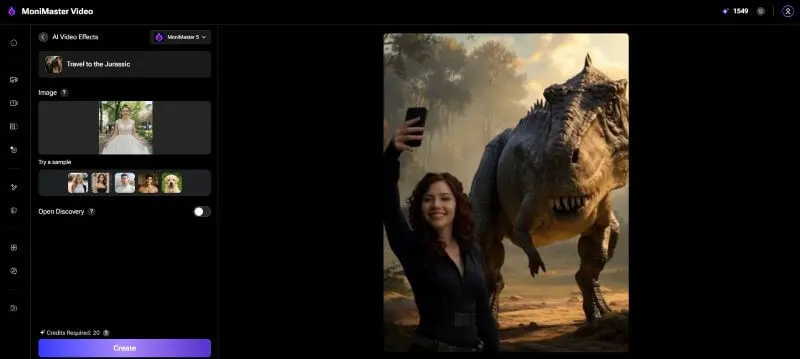
Step 5. Click the Download button to save the video to your local storage.

Conclusion
When you’re intrigued by the dinosaurs of Jurassic World Rebirth and want to create a video of your own, AI dinosaur creators come in handy. Tools like Filmora offer a range of video creation and editing tools, while CapCut can generate a script and a long video based on it. These, however, have a few usability limitations.
MoniMaster Video, however, stands out by providing a wide range of AI models, along with text-to-video and video effects features for added flexibility. The interface is simple, and the output is high-quality, making MoniMaster Video suitable for creators of all experience levels. Use MoniMaster Video today and impress the audience with your creations!
Try It Free
Secure Visit





